How to Hide Online Status in GB WhatsApp
Nowadays, privacy has become an indispensable thing for users. There is always someone tracking people's actions online, but sometimes you need to protect yourself or your activity. Luckily, there is a solution – GB WhatsApp. In addition to all the standard features, it provides additional privacy features like hiding online status.
With GB WhatsApp, you can hide your status, so you stay online, but your contacts can't see any information about you. You can read messages and communicate without being distracted or disturbed.
What Does Hide Online Status Mean?
When you activate this setting, nothing shows your activity online.
Here are the main effects you may get from this:
- No one will see your status
- No one will see when you start typing messages
- Nobody will know that you are online
- You can read messages without showing anyone that you see them
Using this option can bring a lot of benefits to users who seek privacy and security online.
Steps for Hiding Online Status in GB WhatsApp
It is easy to use this feature in the GB WhatsApp application:
Unlock Your Phone and Start GB WhatsApp
Unlock your device and open the GB WhatsApp app. Let the home page load fully.
Access GB Settings
Press the three dots in the upper right corner and tap GB Settings to open a new page with multiple options.
Find Privacy & Security Settings
Tap on Privacy & Security in the menu.
Enable Hide Online Status
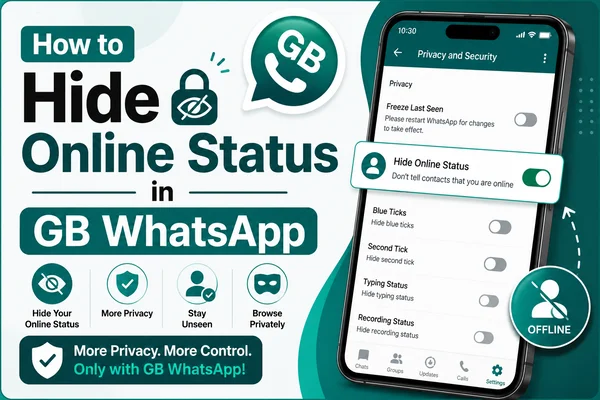
Find the Hide Online Status function in the menu. Toggle the switch on.
Reboot the App (optional)
In case you need the changes to become active instantly, close the app and start it again.
Other Privacy Settings to Utilize
If you need more protection from prying eyes and unwanted contacts, here are some extra settings you should use:
Recommended Settings:
Hide Blue Ticks: See messages without notifications that they were read
Hide Typing Status: Nobody will know when you are typing
Freeze Last Seen: Set your last seen manually
Disable Recording Status: Others won't know when you record voice messages
All these features will allow you to manage the app freely.
Key Points to Remember
There are a few things you must know about GBWhatsApp privacy features:
- Some features may work both ways, making it difficult for you to see their effect on others
- Constant changes to settings may lead to temporary lags in functionality
- Update your app regularly for better results
- Don’t turn all features on
Following these recommendations will allow you to enjoy the app to its fullest potential.
Typical Problems and Fixes
In some cases, people may encounter some small problems when using privacy features. These are the most common and fast solutions:
- You can't hide your status: Restart the app
- The feature doesn't work: Upgrade to the latest version
- Your settings don't stick: Turn the function off and on again
- Lagging app, Clear the app cache
Most of the time, these simple solutions fix the problem instantly.
Smart Recommendations
To make sure that your GB WhatsApp works well, try to:
- Check your settings often
- Only use the features you need to avoid confusion
- Update your app
- Achieve a good balance between privacy and usability
These approaches guarantee maximum convenience.
When Is Hiding Your Status Necessary?
This functionality can come handy in the following cases:
- When you do not wish to be bothered
- When you require focused work
- When you need some privacy
- When you wish to avoid unnecessary chats
This way, you will be able to enjoy maximum flexibility in using the app.
Conclusion
In summary, hiding your online status in GB WhatsApp is an incredibly convenient privacy tool available right now. It offers you a unique opportunity to remain online but maintain total privacy. All you need to do is follow the described guidelines, and you will be able to manage your status in the best way possible.
Remember that using all of these privacy-related features together with others in GBWhatsApp can provide you with a highly personalized environment. If you place privacy above anything else, then you will definitely appreciate GB WhatsApp.